
Importing An Individual Student
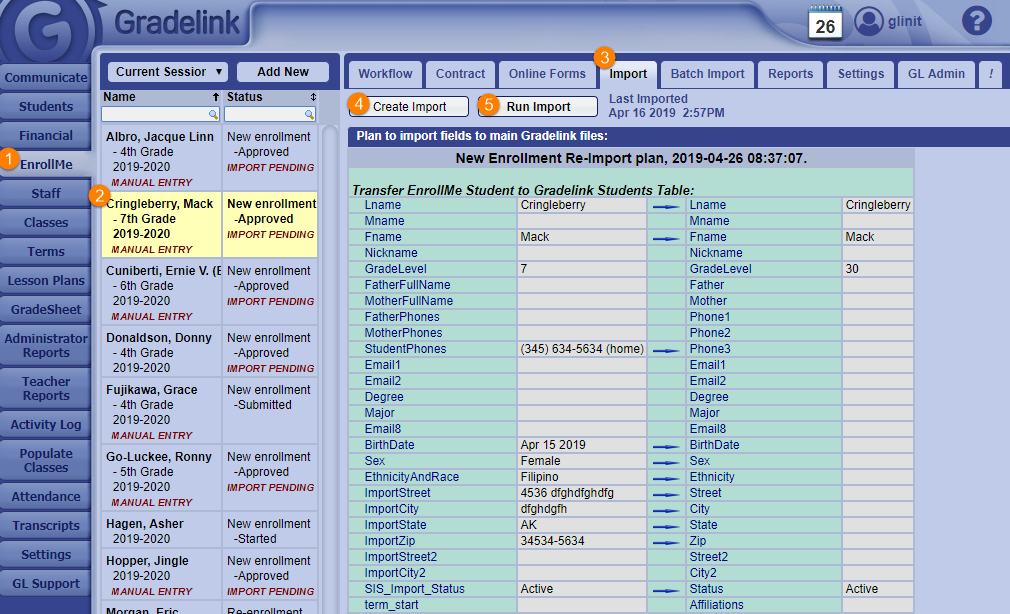
Click the EnrollMe tab on the left sidebar.
Select an application in Workflow with the Approved (IMPORT PENDING) status (a selected application will be highlighted in yellow). Imports can only happen for Approved applications.
Click on the Import sub-tab at the top of the page.
Click on the Create Import button.
Click on the Run Import button.
Note: In order to prevent student grade levels from increasing twice, importing will not change grade levels of existing students in the Students tab. This allows schools to use the promote feature without worrying about whether a student’s EnrollMe application has already changed their grade level.